Nothing expired ever reaches the counter.
Batch-level stock, expiry alerts, and exact shelf location — Floor / Row / Rack — so your staff always know exactly which pack to sell first, and which one never should be.
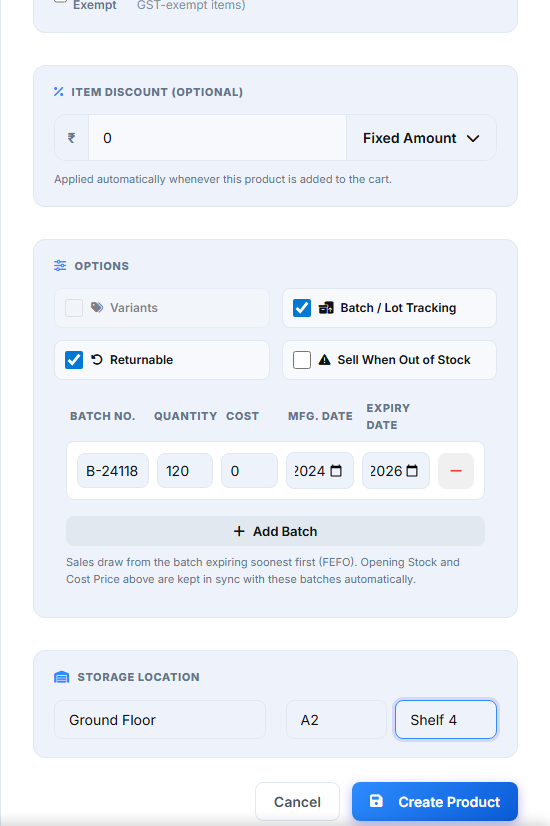
Batch & Lot Tracking that sells the oldest stock first
Turn on Batch / Lot Tracking on any product and every incoming lot gets its own batch number, quantity, cost price, manufacturing date, and expiry date. Stock and cost price are derived automatically from the batch list — no separate stock count to keep in sync. Sales draw from whichever batch expires soonest (FEFO), so older stock actually moves before it becomes a write-off.
Expiry alerts before it's a problem, not after
Every batch's expiry date feeds a real alert — products already expired, or expiring inside a warning window you set, are flagged so your staff catch it during a stock check, not when a customer's already at the counter.
Exact shelf location, not "somewhere in aisle 3"
Every product carries a real Floor / Row / Rack location — "Ground Floor, Row A2, Shelf 4" — right there on the product list, so a new staff member can find any item as fast as someone who's worked the counter for years.
Batch & Lot Tracking
Every lot keeps its own batch number, quantity, cost, and dates.
Expiry Alerts
Expired and soon-to-expire batches flagged automatically.
FEFO Auto-Deduction
Sales draw from the soonest-expiring batch first, automatically.
Floor / Row / Rack Location
Exact shelf location on every product, right on the list.
GST Auto-Compliance
CGST, SGST, and IGST calculated correctly, every sale.
Supplier & Purchase Tracking
Order → Received purchasing, tied straight back to stock and batches.
See batch tracking for yourself
The live demo runs the real app — enable Batch / Lot Tracking on a sample product and try it.